• Please stop embedding files/images from Discord. Discord has anti-hotlinking logic in place that breaks links to Discord hosted files and images when linked to from anywhere outside of Discord. There are a multitude of file/image hosting sites you can use instead.

    (more info here)

Quick Modding/Hacking Answers Thread

Jan 6, 2021 at 4:46 AM
Sincerity will always triumph over irony.
Modding Community Discord Admin
"What're YOU lookin' at?"
Join Date: Apr 23, 2013
Location: In a cave above the surface.
Posts: 1091
Age: 27
Pronouns: He/They
Gender Notes: More info at a later date.
(I'm on mobile so hopefully this is worded right and helps)

2 problems:
1st problem: It wouldn't be the damage function actually. NPCs don't continually check player collision and then run that function from what I've seen. Instead it just has a variable of how much damage should be dealt on contact (this is in the NPC table, so ALL npcs have one). There's seperate generalized functions that check collisions for the NPCs and will calculate that etc.
This variable is expressed as "E?X+A4" in the NPC's code. You'd be changing the constant in an instruction that goes something like

MOV DWORD --?-- [E?X+A4],###

where ### is the damage.

2nd Problem: Balfrog (as is most mapbosses) is actually composed of seperate sub-entities with different hitboxes. iirc there's two that both deal damage.
You can find the offsets towards the end of this sheet. (This link is also pinned in CSMC's #resources.)
Looks like Balfrog has 3 entities (one of them being the main one that Hayden gave you the offset for). And your gonna change any E?X+A4 constants you happen to find like I mentioned earlier. That should do it!
 
Jan 6, 2021 at 2:14 PM
Senior Member
"This is the greatest handgun ever made! You have to ask yourself, do I feel lucky?"
Join Date: Oct 22, 2014
Location: Xyrinfe multiverse
Posts: 100
Age: 30
Pronouns: she/her
Some maps have no background in-game, despite the map properties being set.
(And in one case, at least one map that did have a background in-game, suddenly stopped having it.)

Is there any way to fix this, and if so, how?
 
Jan 6, 2021 at 4:32 PM
Moo~
"Life begins and ends with Nu."
Join Date: Jun 27, 2013
Location:
Posts: 2940
Age: 31
Pronouns: She/Her
Some maps have no background in-game, despite the map properties being set.
(And in one case, at least one map that did have a background in-game, suddenly stopped having it.)

Is there any way to fix this, and if so, how?
Depends on these two factors.
1. Is the background type set to "Hide"?
2. Are you using Cave Editor and are making maps past room 94?
 
Jan 6, 2021 at 4:49 PM
Senior Member
"This is the greatest handgun ever made! You have to ask yourself, do I feel lucky?"
Join Date: Oct 22, 2014
Location: Xyrinfe multiverse
Posts: 100
Age: 30
Pronouns: she/her
Only three maps using the Water Level entity are set to "3 - hide". (Though the water doesn't show up on one map, despite showing up on the other.)

Yeah, I'm using CE (with maps numbered to 099).
I'd use Booster's Lab 0.4.5.0 but I can't place entities in that (I'm guessing that's an issue on my end that can't currently be fixed, due to circumstances) so... kinda stuck with CE here. :/
 
Jan 6, 2021 at 5:00 PM
Moo~
"Life begins and ends with Nu."
Join Date: Jun 27, 2013
Location:
Posts: 2940
Age: 31
Pronouns: She/Her
In v450 and above, you need to press the "i" key, cuz double clicking really resulted in quite the number of bugs. I do suggest using BL v500 since that's the most stable version (and v511 really has some issues that have been reported to Noxid and Leo and not a single fix was made).
 
Jan 6, 2021 at 6:28 PM
The miracles of alchemy...!
Bobomb says: "I need a hug!"
Join Date: Jul 20, 2015
Location: Under sea level or something
Posts: 831
Age: 27
Pronouns: 菓子
I'd use Booster's Lab 0.4.5.0 but I can't place entities in that (I'm guessing that's an issue on my end that can't currently be fixed, due to circumstances) so... kinda stuck with CE here. :/
Try either doubleclick lmb or the i key.
 
Feb 10, 2021 at 3:31 AM
Neophyte Member
"Fresh from the Bakery"
Join Date: Feb 6, 2021
Location: Canada
Posts: 9
Age: 20
Pronouns: she/her
my friend wanted me to convert his freeware save to cs+ but its in normal mode and he wants it in easy mode
how would i change it
 
Feb 10, 2021 at 3:46 AM
Neophyte Member
"Fresh from the Bakery"
Join Date: Feb 6, 2021
Location: Canada
Posts: 9
Age: 20
Pronouns: she/her
nvm its at c30 in hxd and changed 00 to 02
 
Feb 27, 2021 at 8:33 AM
Junior Member
"Wow! The more I drink of this magical beverage, the more games I can play! Wheee!"
Join Date: Feb 26, 2021
Location:
Posts: 26
Age: 18
Pronouns: he/him
This is my fist time modding and I would like to know how to do a few things in Cave Editor
1. How do I change Quote's Sprite ( I can't find it)
2. How do I get a working door transition with a music change
3. How do I do a door and key System
4. How do I change the Title and the intro ________Presents
 
Feb 27, 2021 at 8:53 AM
Moo~
"Life begins and ends with Nu."
Join Date: Jun 27, 2013
Location:
Posts: 2940
Age: 31
Pronouns: She/Her
This is my fist time modding and I would like to know how to do a few things in Cave Editor
1. How do I change Quote's Sprite ( I can't find it)
2. How do I get a working door transition with a music change
3. How do I do a door and key System
4. How do I change the Title and the intro ________Presents
1. data/MyChar.bmp (make sure to save as 24-bit bitmap to keep the changes without the colors fucking over)
2. You can copy/paste the TSC for the events in the scripts to help give you an idea on how it'll work.
3. You can use <ITJ (ITem Jump) to jump to an event when you have whichever item is necessary. Otherwise, you won't be able to access the next room.
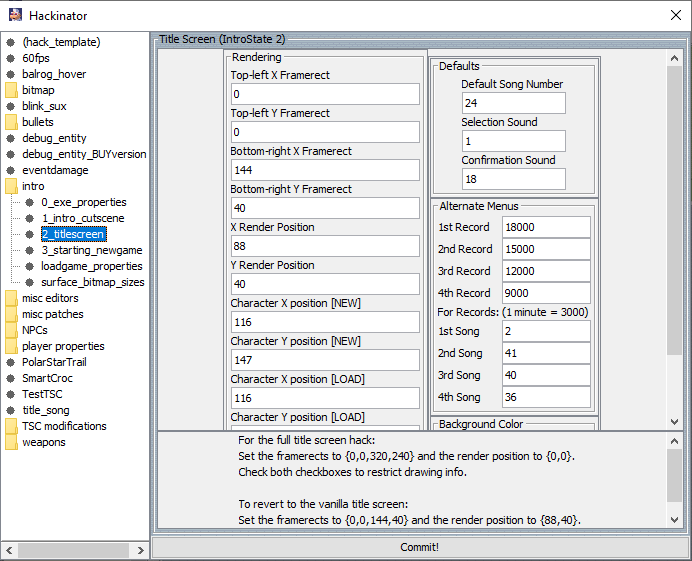
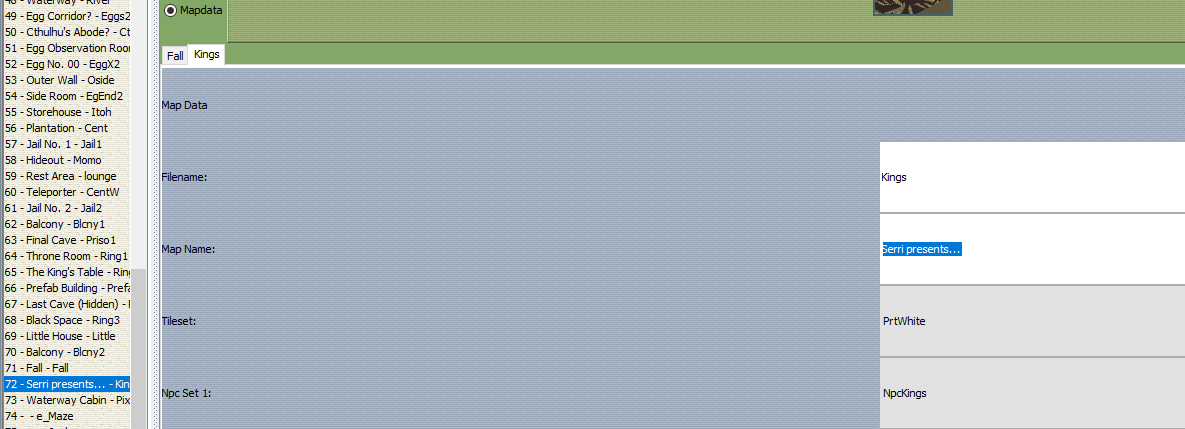
4. Title:
p375242-0-u6g0ty.png
p375242-1-kjsho2.png

Just be sure to modify Title.bmp if you decide to make it full-screen. If you don't wanna touch the config, then you can just modify the bitmap.
p375242-2-wnl2ic.png
 
Feb 27, 2021 at 11:10 AM
Junior Member
"Wow! The more I drink of this magical beverage, the more games I can play! Wheee!"
Join Date: Feb 26, 2021
Location:
Posts: 26
Age: 18
Pronouns: he/him
1. data/MyChar.bmp (make sure to save as 24-bit bitmap to keep the changes without the colors fucking over)
2. You can copy/paste the TSC for the events in the scripts to help give you an idea on how it'll work.
3. You can use <ITJ (ITem Jump) to jump to an event when you have whichever item is necessary. Otherwise, you won't be able to access the next room.
4. Title:
p375242-0-u6g0ty.png
p375242-1-kjsho2.png

Just be sure to modify Title.bmp if you decide to make it full-screen. If you don't wanna touch the config, then you can just modify the bitmap.
p375242-2-wnl2ic.png
Ok thanks I found a program to edit sprites called pixelformer to change the title and characters, and I will try reusing code for existing doors.
 
Mar 8, 2021 at 6:34 PM
Senior Member
"This is the greatest handgun ever made! You have to ask yourself, do I feel lucky?"
Join Date: Jun 24, 2020
Location: The Thousands Of Alt Accounts Club
Posts: 115
Pronouns: he/him
How do you change the backround on the title screen? Don't tell me you can't because I've seen it.
 
Mar 8, 2021 at 6:45 PM
Based Member
"Life begins and ends with Nu."
Join Date: Dec 31, 2011
Location: United States
Posts: 2323
Age: 29
Pronouns: he/him
That's done via assembly hacking. There's a specific assembly hack that does that called the Title Screen Hack. It's even built into Booster's Lab. If you go to "Actions" -> "Hacking Tool", then select "titlescreen," and then it will patch the EXE with this hack that lets you have a custom image on the title screen.
 
Mar 8, 2021 at 6:56 PM
Senior Member
"This is the greatest handgun ever made! You have to ask yourself, do I feel lucky?"
Join Date: Jun 24, 2020
Location: The Thousands Of Alt Accounts Club
Posts: 115
Pronouns: he/him
That's done via assembly hacking. There's a specific assembly hack that does that called the Title Screen Hack. It's even built into Booster's Lab. If you go to "Actions" -> "Hacking Tool", then select "titlescreen," and then it will patch the EXE with this hack that lets you have a custom image on the title screen.
now what.

--Edit--
@HaydenStudios Ya there? anyone?
 

Attachments

  • Booster's Lab V0.5.1.1  3_8_2021 12_56_39 PM.png
    Booster's Lab V0.5.1.1 3_8_2021 12_56_39 PM.png
    59.6 KB · Views: 5
Last edited:
Mar 8, 2021 at 7:10 PM
Based Member
"Life begins and ends with Nu."
Join Date: Dec 31, 2011
Location: United States
Posts: 2323
Age: 29
Pronouns: he/him
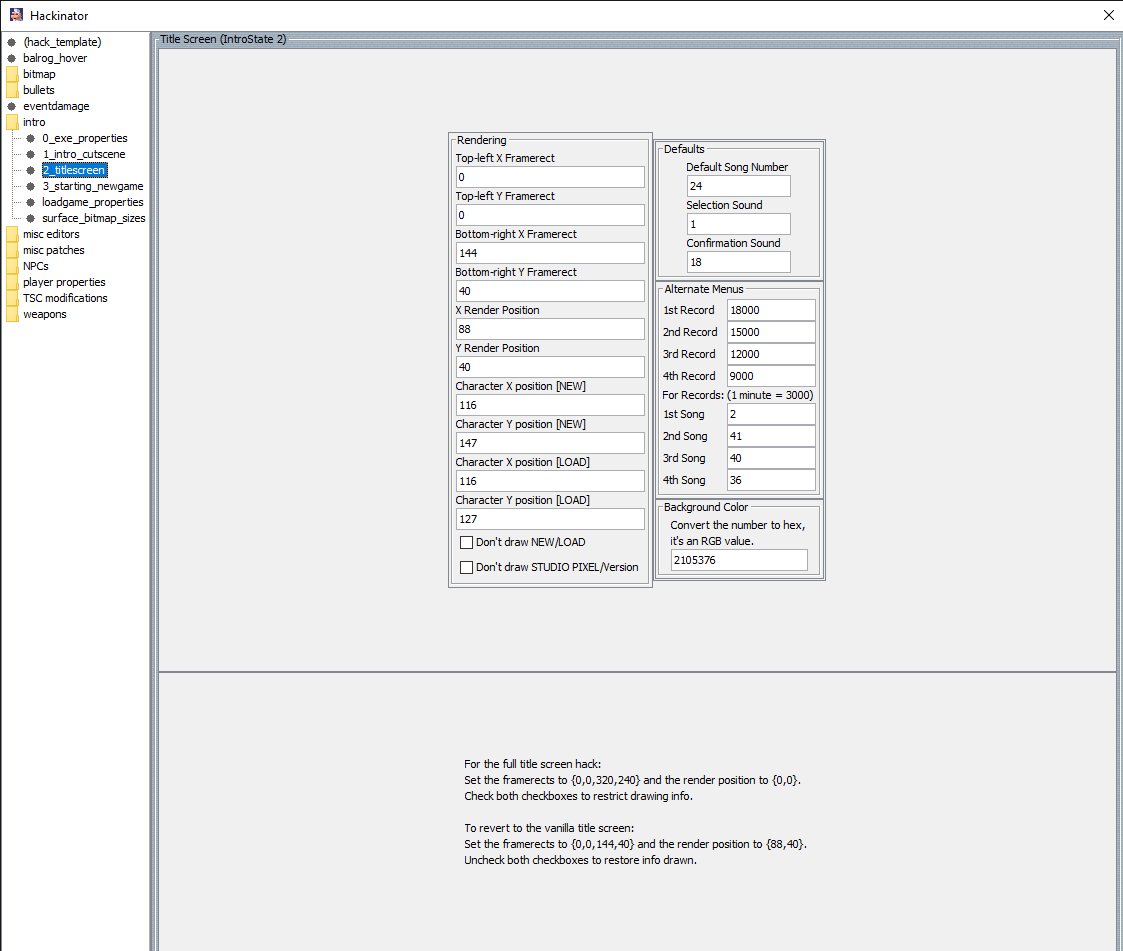
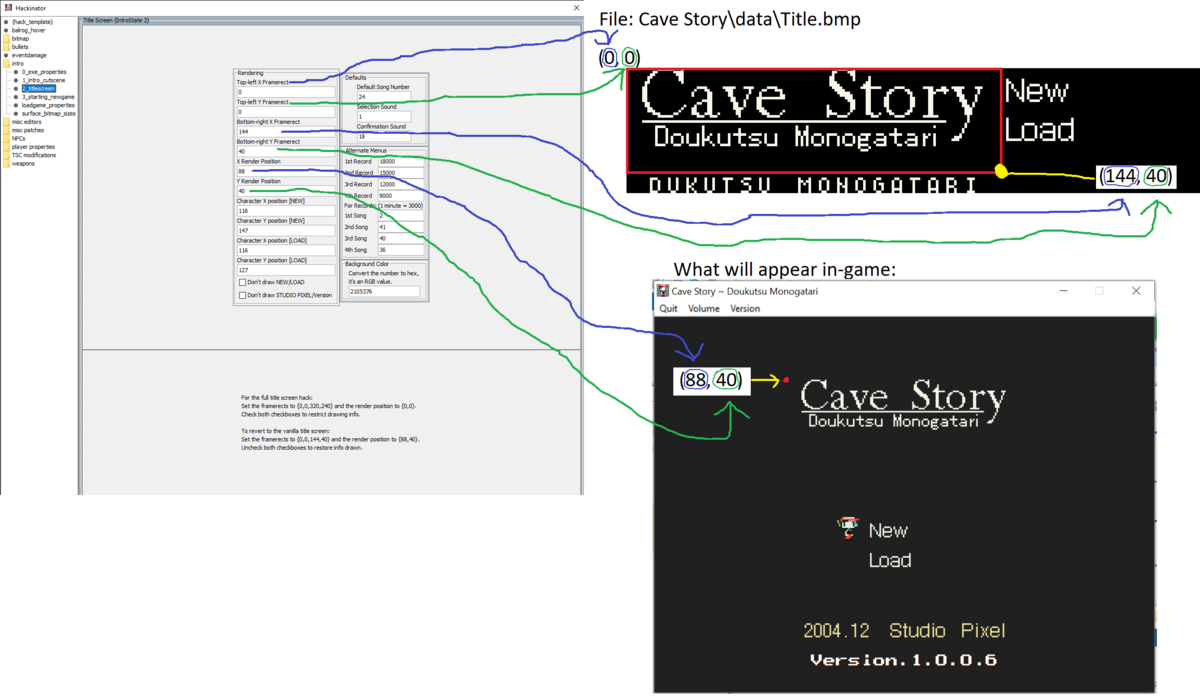
Open up "Title.bmp" in the data folder. By default, the game extracts the title screen a framerect in that image with the top-left corner of (0, 0), and a bottom right of (144, 40). You'll probably want to edit "Title.bmp" to have your full image in the top left region of the image, and change the bottom-right X/Y framerect values to 320/240, respectively. The "X Render Position" and "Y Render Position" defines where the title image will be drawn. For your purposes, I'm guessing you'll probably want to change these both to 0.

I'm guessing that the graphics for the "New" and "Load" buttons will need to be placed directly to the right, outside of wherever you set the framerect for the title screen.

Once you've changed those values accordingly, you should be able to patch in the hack by clicking "Commit!"
 
Mar 8, 2021 at 7:12 PM
Senior Member
"This is the greatest handgun ever made! You have to ask yourself, do I feel lucky?"
Join Date: Jun 24, 2020
Location: The Thousands Of Alt Accounts Club
Posts: 115
Pronouns: he/him
Open up "Title.bmp" in the data folder. By default, the game extracts the title screen a framerect in that image with the top-left corner of (0, 0), and a bottom right of (144, 40). You'll probably want to edit "Title.bmp" to have your full image in the top left region of the image, and change the bottom-right X/Y framerect values to 320/240, respectively. The "X Render Position" and "Y Render Position" defines where the title image will be drawn. For your purposes, I'm guessing you'll probably want to change these both to 0.

I'm guessing that the graphics for the "New" and "Load" buttons will need to be placed directly to the right, outside of wherever you set the framerect for the title screen.

Once you've changed those values accordingly, you should be able to patch in the hack by clicking "Commit!"
you still make no sense but ok.
 
Mar 8, 2021 at 7:15 PM
Based Member
"Life begins and ends with Nu."
Join Date: Dec 31, 2011
Location: United States
Posts: 2323
Age: 29
Pronouns: he/him
What part in particular doesn't make sense? Are you familiar with what framerects are? If this was confusing to you, I can make a picture that illustrates what fields in that Booster's Lab hack relate to what properties of the title screen.
 
Mar 8, 2021 at 8:05 PM
Moo~
"Life begins and ends with Nu."
Join Date: Jun 27, 2013
Location:
Posts: 2940
Age: 31
Pronouns: She/Her
I'm guessing that the graphics for the "New" and "Load" buttons will need to be placed directly to the right, outside of wherever you set the framerect for the title screen.
Actually, you can just draw the new ones in the title bitmap itself, especially since the "Don't Draw New/Load" option is there, and there is no setting to assign new framerects for those, anyway. Of course, you can also just have the origin for the title screen framerects be offset more vertically down for the bitmap, and keep the New/Load symbols intact.
 
Mar 8, 2021 at 8:07 PM
Senior Member
"This is the greatest handgun ever made! You have to ask yourself, do I feel lucky?"
Join Date: Jun 24, 2020
Location: The Thousands Of Alt Accounts Club
Posts: 115
Pronouns: he/him
Last edited:
Mar 8, 2021 at 9:17 PM
Based Member
"Life begins and ends with Nu."
Join Date: Dec 31, 2011
Location: United States
Posts: 2323
Age: 29
Pronouns: he/him
Okay, let me know if this helps:
 

Attachments

  • Booster's Lab Hackinator.png
    Booster's Lab Hackinator.png
    210.6 KB · Views: 6
Back
Top